JTPA Community Hub: A community platform for running AI meetups


Why I Built It
Bay Area AI / JTPA activities can easily become scattered across many tools: event announcements, RSVPs, presenter info, slide sharing, check-in, project showcases, blog posts, Q&A, and polls. Organizers need a reliable way to manage events, while members need one place to find upcoming events, past materials, and what others are building.
I built this as a unified community hub for AI meetup operations. The Showcase feature you are reading now is part of the same platform.
What It Does
JTPA Community Hub is a web application for running the Bay Area AI / JTPA community. It includes:
- Event listings, event detail pages, RSVPs, and waitlists
- Presenter registration, talk titles/abstracts, and slide or recording links
- QR-code check-in for event day attendance
- AI project Showcase submissions, admin review, comments, and likes
- Member blog posts, Q&A, guides/notes, and community polls
- Google sign-in, public profiles, and member dashboards
- Admin tools for events, reviews, attendee CSV export, and roles
- Japanese and English localization
The goal is not just a public website. It is an operational backbone for a recurring AI meetup and a place where knowledge can accumulate over time.
How It Works
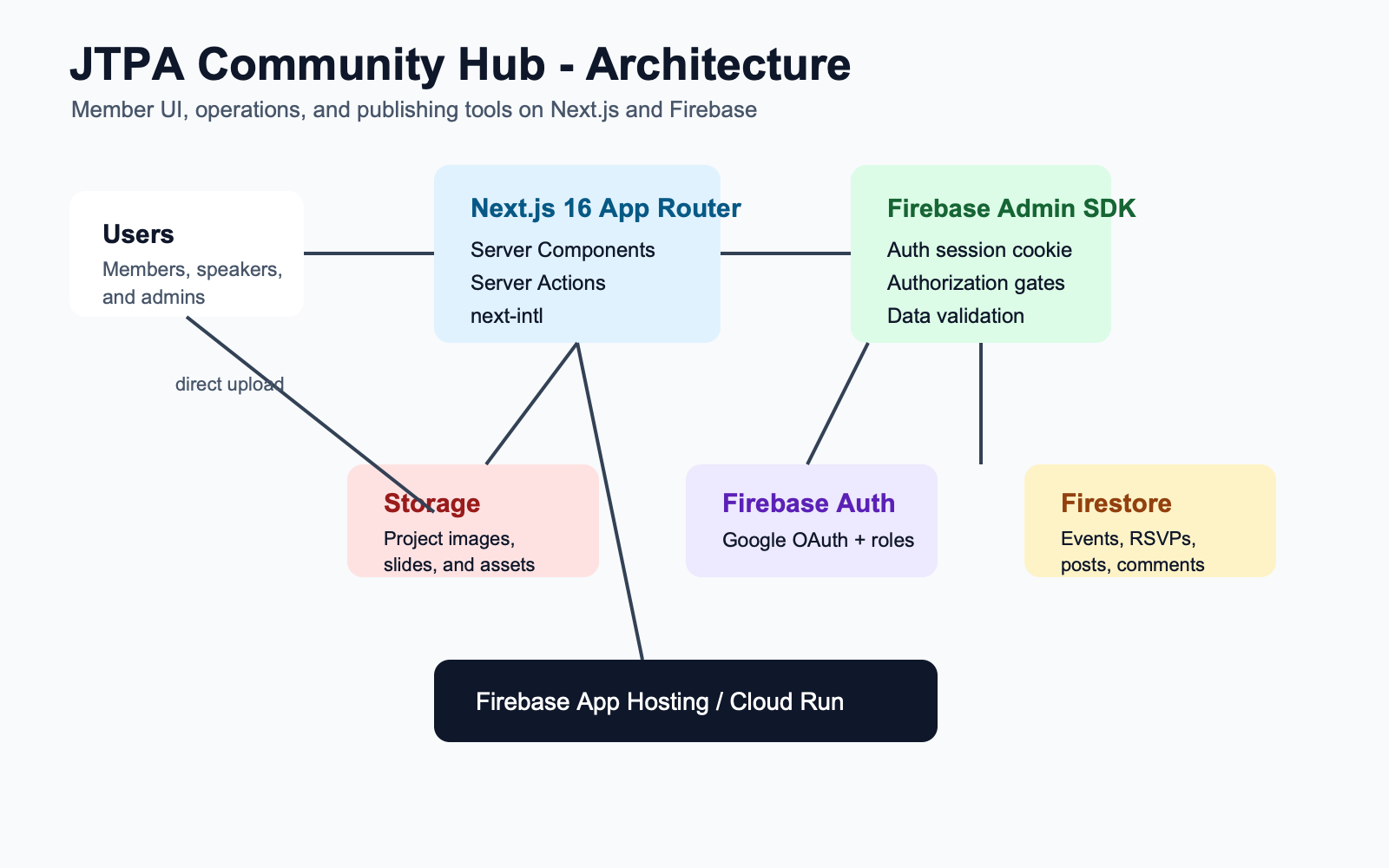
The app is built with Next.js 16 App Router and React 19, hosted on Firebase App Hosting. Firestore stores data, Firebase Auth handles Google OAuth, and Firebase Storage stores project images, event assets, and presentation files.
A key design choice is that almost all Firestore reads and writes go through the server. Server Components load page data, and Server Actions handle RSVPs, submissions, approvals, comments, likes, and check-in. The browser does not directly write application data to Firestore. Authorization is centralized in helpers such as requireUser, requireAdmin, and requireEditor.
Large files use a different path: images and slides upload directly from the browser to Firebase Storage. After upload, a Server Action records only the metadata in Firestore, so Cloud Run does not proxy heavy file transfers.
How I Used AI to Build It
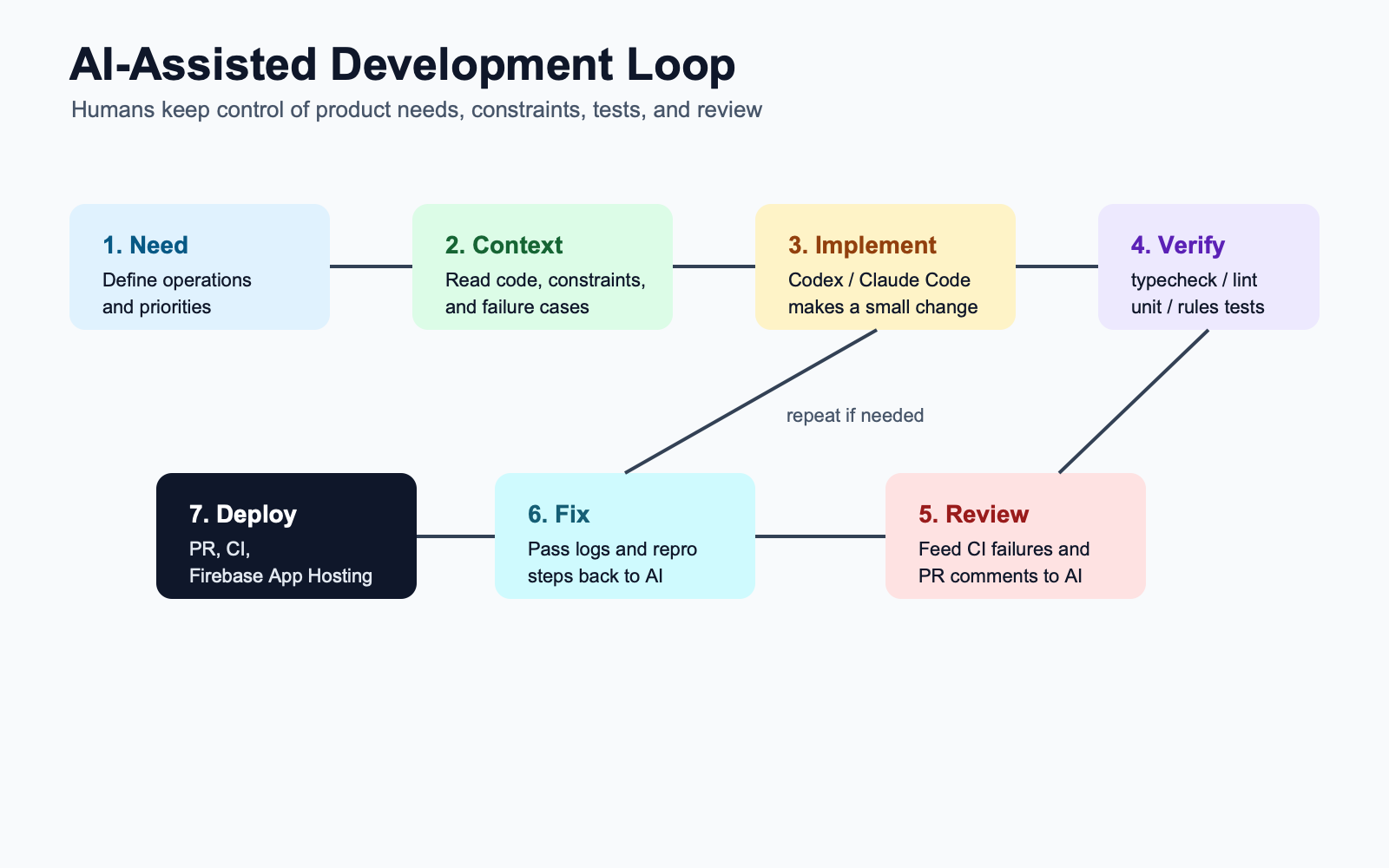
Most of the implementation was developed with Codex and Claude Code. I did not treat AI as a black-box "build the whole app" button. I broke the product down feature by feature and gave the AI the relevant code, constraints, expected behavior, and verification commands.
The typical loop was:
- I defined the need, such as waitlisted RSVPs, QR check-in, or reviewed project submissions
- I asked AI to read the data model, Server Actions, Firestore rules, and UI patterns
- AI proposed a plan, and I checked authorization, data consistency, and failure cases
- AI implemented a small change
- I ran
npm run typecheck,npm run lint,npm test, and rules tests, then fed CI or review feedback back into AI
AI was especially useful for expanding consistent patterns: Firestore schemas, Server Actions, admin screens, Markdown editors, i18n copy, tests, and docs. Once a pattern existed, AI helped apply it to events, projects, posts, Q&A, polls, comments, and likes.
The parts that still needed strong human control were security, permissions, moderation workflow, product decisions, and UX. I treated AI-generated code as a draft, especially around who can perform an action, what happens if a write fails, and whether a pending or rejected submission can become public.
What Was Hard
The hardest part was balancing a simple community-facing experience with the strictness required by an operations tool. Members should see a clean site, while the system still handles RSVP counts, waitlists, presenter counts, attendance counts, approval status, ownership, roles, and file permissions correctly.
QR check-in was a good example. It needed event-specific validity windows, login redirects back to the QR URL, duplicate check-in protection, admin corrections, and cumulative attendance counts.
Next.js 16 also has meaningful changes compared with older versions, so it was important to make the AI read local docs and APIs instead of relying on stale assumptions.
What I Learned
The most important lesson was that AI coding works best when constraints are clear. Prompts like "read this file," "follow this pattern," "keep this authorization boundary," and "run these tests" were much more effective than vague requests.
AI can speed up implementation dramatically, but it does not replace product judgment. Decisions such as which content requires review, whether Q&A should publish immediately, and what event attendees should provide need to come from people who understand the community.
What's Next
Next, I want to add AI-powered summaries for posts and Q&A, automatic event recap drafts, recommendations for relevant projects or guides, and better analytics for organizers. The long-term goal is to make community knowledge easier to find and reuse after each meetup ends.
Detailed Project Case Study
I also wrote a more detailed English case study about this project on my portfolio site. It summarizes the product goals, my role, key features, technical architecture, AI-assisted development workflow, challenges, and outcome from a professional project perspective.
Comments (0)
No comments yet.
You need to log in to comment.
Log in with Google